Review
Jobber AI Receptionist Review: What I Tested, What Broke, and What It Costs
| Date tested | November 4 to 5, 2026 |
| Plan I paid for | Core Monthly plus the Receptionist add-on |
| Real monthly cost | $69 before tax ($73.42 charged with tax) |
| Tested on | Test calls in Jobber's test mode, not live calls |
| What broke | A health question missing from the request, a phone number that lost its last digit, no escalation alert |
If you run a lawn, cleaning, or other service business, a missed call is a lost job. Jobber sells an AI Receptionist that answers calls and texts for you. I run a home services business, so I paid for it and tested it. This review is based on test calls made in Jobber's test environment on November 4 and 5, 2026, not live calls from real customers. I explain below why I could not go live.
The short answer
The Receptionist is better than I expected at the conversation. It did not invent prices, it corrected a wrong email address, and it mostly kept up with a noisy call. Its weakest spot is handing details to the place your team actually works. A health question I asked appeared in the call summary but not in the request created from the call, and in another test it dropped the last digit of a phone number I gave. Adding one line to the Policies text fixed the phone and email read-back in my later tests. Going live also asks a solo owner for far more paperwork than the sales page suggests. My verdict is that it is useful but could get expensive quick if you have a lot of calls.
What I could and could not test
| I tested | I could not test |
|---|---|
| Setup, start to finish up to the phone number step | Live calls on a real phone number |
| Voice test calls in Jobber's test mode | Text messages and text-back to missed callers |
| A noisy call, a wrong email, a price question | The after-hours greeting (the test call ignored changed business hours) |
| An out-of-scope service question | Call forwarding from an existing number |
| A trigger-word escalation | Call transfer and escalation alerts |
| Summary emails, requests, and the dashboard | Whether it books a time slot directly. In my test it created a request asking the team to confirm availability, not a booked appointment. |
Setup and testing: about 2 hours over two days, and setup was not finished
Setup and testing took me about 2 hours (118 minutes) across two days: 52 minutes on November 4 and 66 minutes on November 5. That includes 14 minutes lost because signup failed in Chrome with a generic error, and it includes the time I spent making test calls. Setup itself was still not finished. Signup worked in Safari. The Receptionist is an add-on, so I had to upgrade my plan before I could use it.
- Jobber's AI wrote a starting set of business details for me. They were not fully accurate and the character limit is small, so plan to rewrite them.
- Clicking to edit the information it collects from callers took me out to the Forms section. It opened in another tab, so I could get back.
- The verification call to my own phone came from a blank caller name with a robot voice and asked me to press 1. It looked like spam. After I pressed 1 there was a pause before the Receptionist spoke. On my test calls I also did not hear the Receptionist's opening line live, although it is audible on the call recording.
- Setup stopped at the phone number step. More on that below.
What worked
- It did not make up prices. I asked what a 5,000 square foot lawn would cost. It said it did not have prices and would include the question in the request.
- It fixed my mistake. I said my email address wrong and it corrected me.
- It handled noise reasonably well. I turned up a TV. It was slightly delayed and got my last name wrong, but it captured most of what I said.
- It improved when I gave it more information. At first it knew nothing about pest control methods or liquid versus granular fertilization. After I added detail to the company information and called again, it answered the pest control question.
- It creates real work records. Each call produced a request in Jobber, and some produced a task. The task assignment email reached my inbox within a few minutes of the call.
- A one-line instruction fixed the read-back, in two tests. On one call the Receptionist did not repeat my phone number back when I gave it, and when it finally read the number back at the end, the last digit was missing (more under What broke). To fix that, I added a sentence to the Policies text asking the Receptionist to repeat phone numbers back right after hearing them. On my next call it repeated the number immediately after I gave it, and the number stored in the request was correct. On a retest it also repeated my email address back letter by letter, and both were stored correctly. That is only two calls, so I would not call it proven, and Jobber says that text guides the AI but is not followed word for word.

What broke
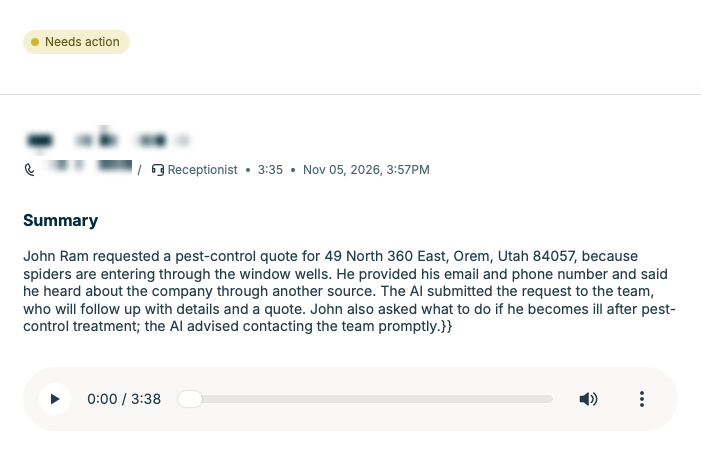
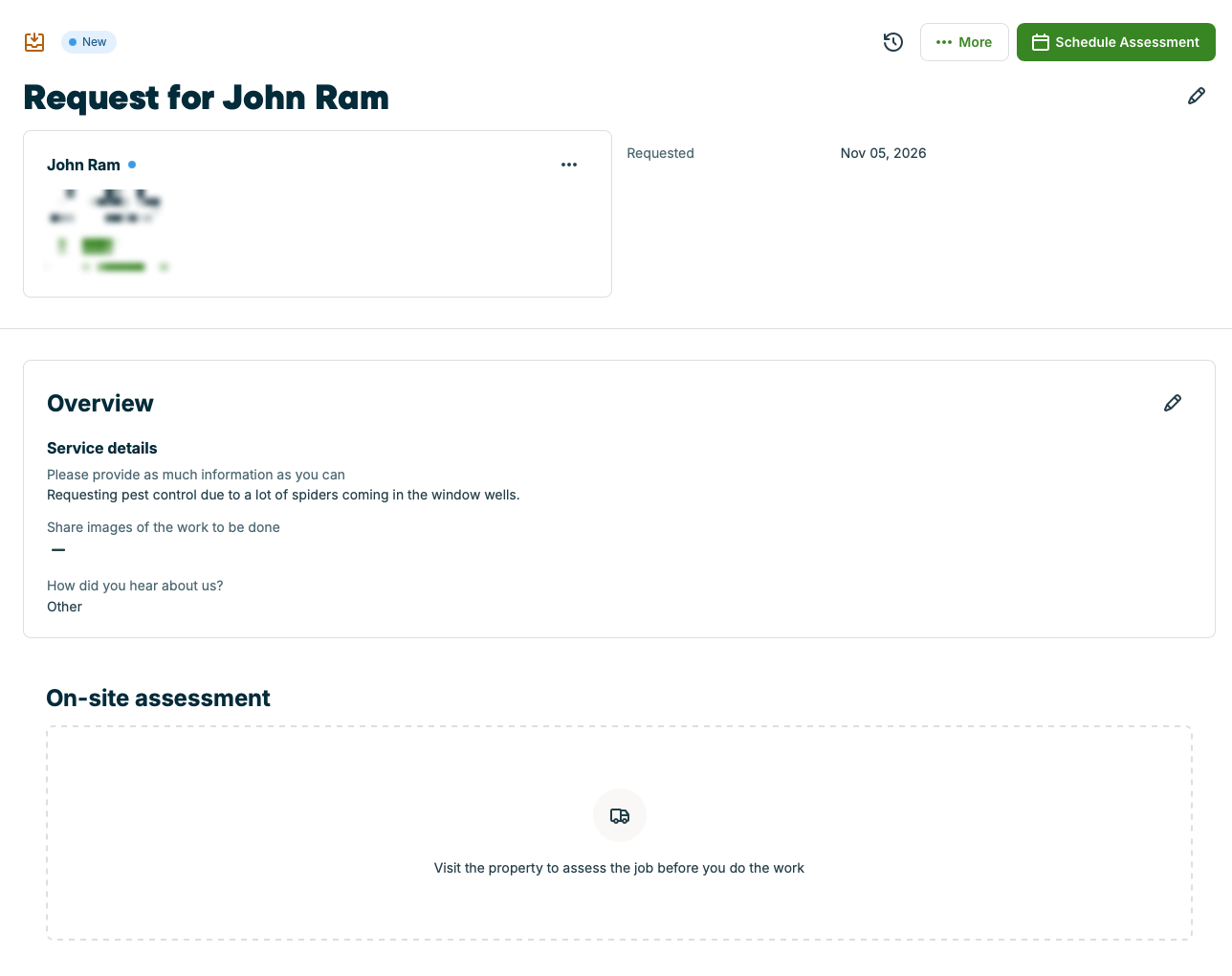
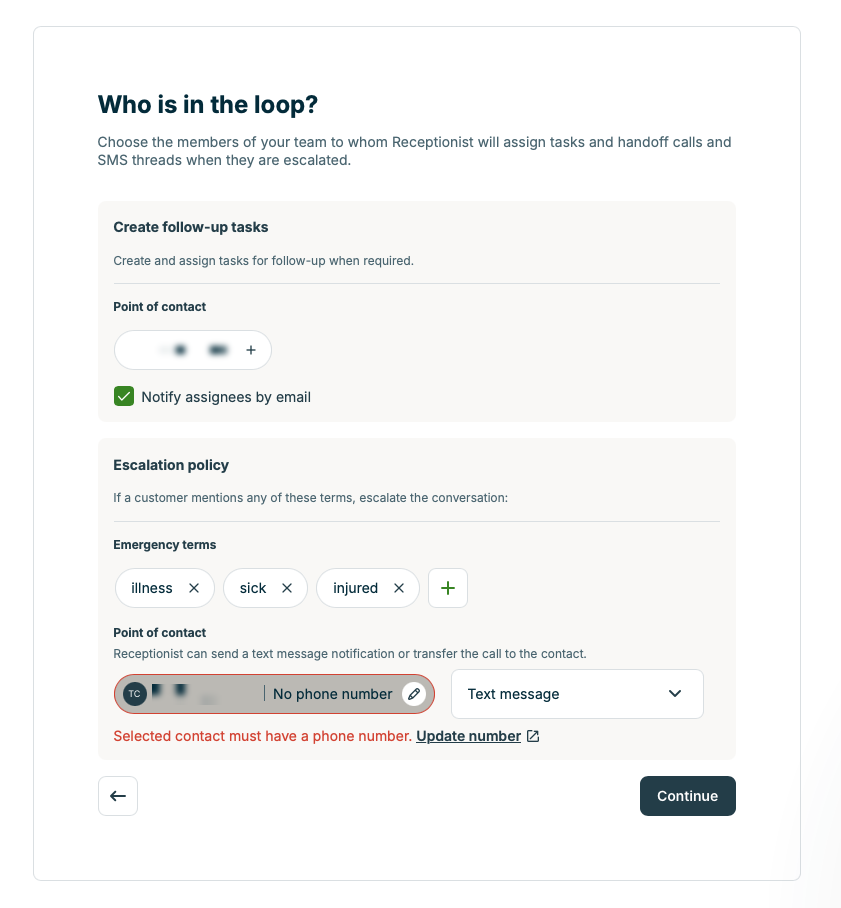
- A health question never reached the request. I asked what to do if someone gets sick after a pest control treatment. The call summary recorded my question. But the request, which is what your team actually works from, only said I wanted pest control for spiders. My question was missing. I had set "illness" as a word that should alert me, yet no alert came and the call was not flagged. One possible reason: during setup, Jobber showed that the person to be alerted had no phone number on file, and it requires one. I could not confirm that was the cause. Jobber's help assistant said details can appear in the summary but not in the request, and advised reading the summary and adding anything important to the request by hand. If a customer could raise a health or safety concern, do not rely on the request alone.
- Details went missing from the summary email. After my first test call, the email left out lawn care and my question about organic products.
- Names were off. One summary called me "Ty Christian," which was wrong. Another said "Thomas Christensen," which was correct because I gave that name on that call. The summary also ended with stray "}}" characters.
- It matched my call to a fake client. My account contained a sample client with my name, an out-of-state billing address, and a placeholder phone number. Jobber confirmed it is sample data. Requests from my calls attached to that client, and the Requests page showed its placeholder number first, with my real number listed second. Jobber could not say what triggered the match. If you test with your own name or email, expect this.
- A contradictory answer. I asked about gutter cleaning. It said it had no pricing and offered to request details, then said the business does not offer gutter cleaning.
- Test calls leave records behind. Each call with a new address added a property to the same client. Clean these up before going live.
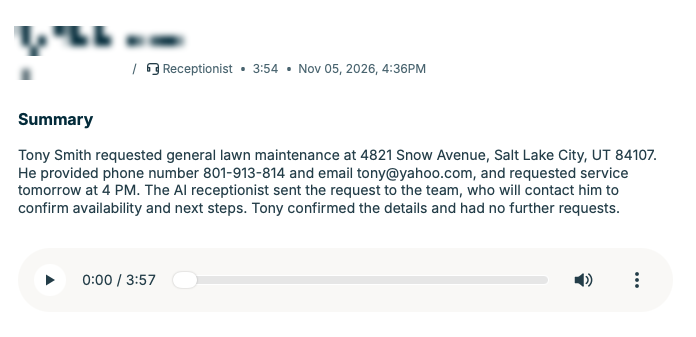
- A phone number lost a digit. In the booking call I gave a 10-digit number. The Receptionist did not repeat it back when I said it and kept the conversation going. At the end of the call it read the number back with the last digit missing, and I did not catch it. The request and summary stored a 9-digit number, which is not valid, and nothing flagged it. If the caller does not catch the mistake, the lead cannot be called back from the request. The caller ID is still in the conversation record, but only if someone looks there.
What it costs
Per Jobber's help center, as of October 14, 2026: the Receptionist is included with the Plus plan, and on select other plans it is a $29 per month add-on that includes 30 conversations, with each extra conversation costing $0.79. Conversations tagged "no conversation" or "spam" do not count.
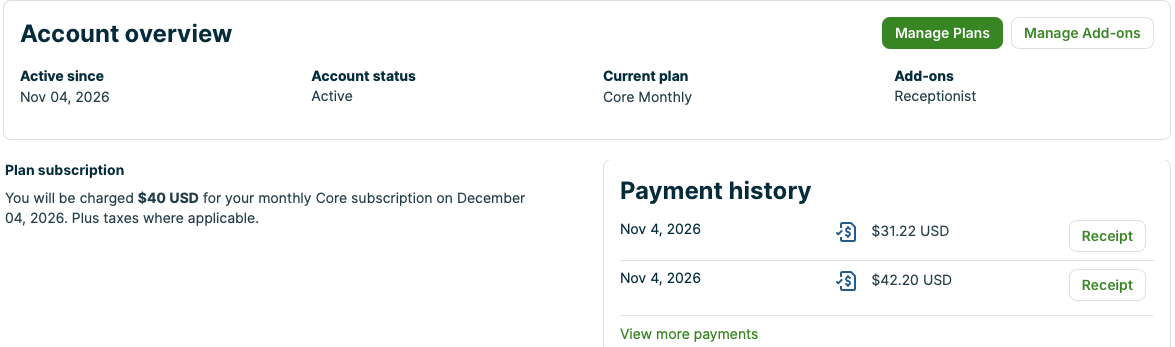
In my account, the Core Monthly plan is $40 per month and the Receptionist add-on is $29 per month, so $69 per month before tax. Jobber's checkout screen showed Core at $29 per month, but that rate was for an annual plan. My two charges on November 4 were $42.20 and $31.22 with tax, $73.42 in total. Jobber support told me that test calls count toward the 30 included conversations, so testing uses your allowance. Test calls I made before I paid for the Receptionist did not count. Once I paid, every test call counted, and my dashboard now shows 5 used.
Using Jobber's published rates, here is what the add-on costs at different volumes. These are calculations, not my results:
| Conversations per month | Add-on cost | Cost per conversation |
|---|---|---|
| 30 | $29.00 | $0.97 |
| 60 | $52.70 | $0.88 |
| 100 | $84.30 | $0.84 |
| 150 | $123.80 | $0.83 |
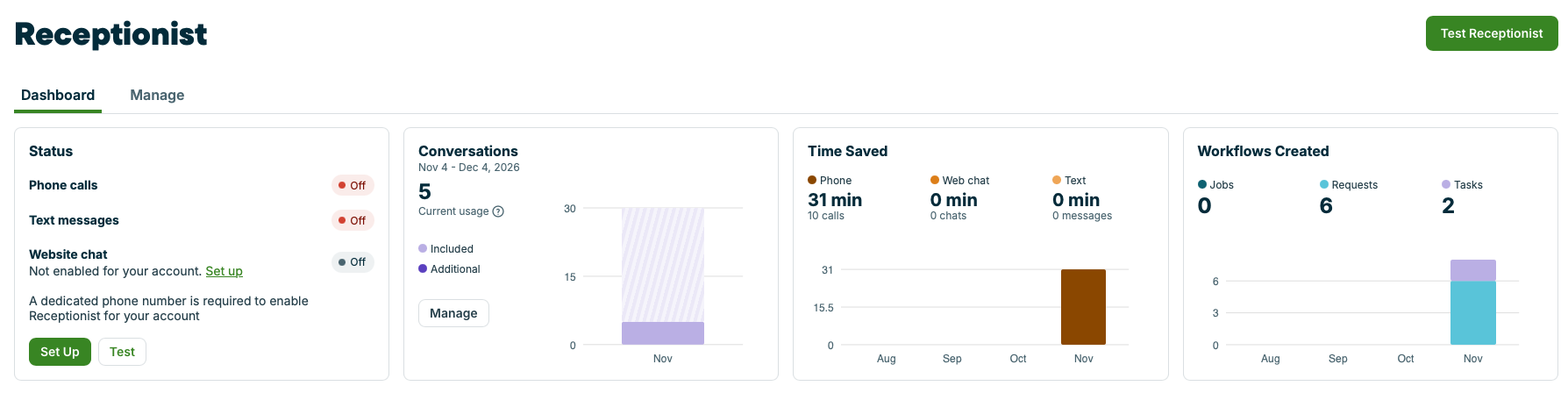
The dashboard also reported "time saved" for my calls. Those were my own test calls, so ignore that number when judging value.
Why I could not go live
The Receptionist needs a dedicated Jobber phone number. Jobber picks numbers near the phone number in your company settings and does not guarantee a local area code. In my case none of the numbers offered were local. The choices had Minnesota, Nevada, Alabama, and Massachusetts area codes. Jobber says to check back in a few days if you do not see yours, and it warns that once you choose a number you cannot change it.
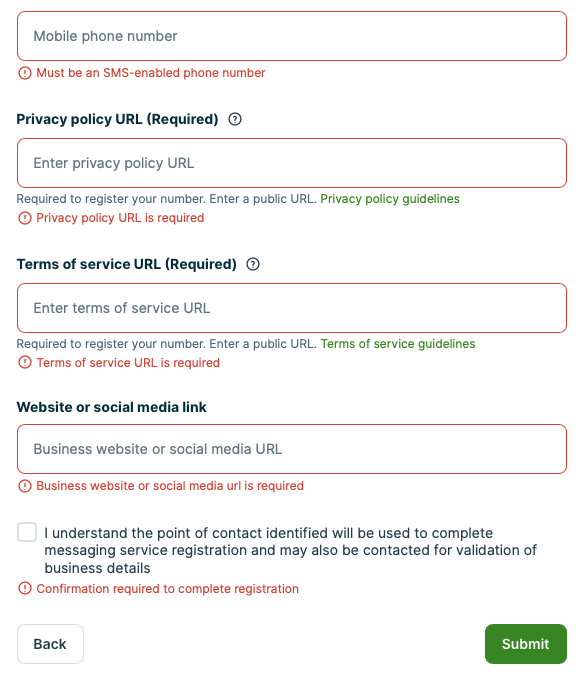
After choosing a number, Jobber asks you to register it before the Receptionist can answer calls. A Jobber agent confirmed in live chat that all of the registration information is required even if you only want phone answering, not texting. You provide:
- a legal business name and business type (a sole proprietor can skip the tax ID, and the agent said a sole proprietor can use their own name)
- a street address, no PO box
- a point of contact with an SMS-capable mobile number
- a public privacy policy URL and a public terms of service URL
- a business website or social media link
I did not submit it. The form is a carrier registration for text messaging, and I do not use Jobber to message real customers. If you already have a business, a website with those two pages, and a street address you are comfortable listing, this is manageable. A new solo owner should plan for it before paying.
Who it fits and who should skip it
- A fit if you already use Jobber and can complete the registration. It suits the small business owner who regularly misses calls because they are on jobs, when those potential clients do not leave voicemail messages.
- Skip it if you want to be answering calls this week with no paperwork, or if callers may ask health or liability questions that must reach a person for certain.
Questions people ask
Can I keep my existing phone number? Jobber says the Receptionist needs a Jobber dedicated number, and you can forward calls from your existing number through your carrier or Google Voice. Jobber could not guarantee the forwarded-to number is never visible under every carrier setup.
Does it book jobs on its own? Per Jobber, it uses your Online Booking settings for scheduling and rescheduling. In my test it did not book a time. It created a request for the team to confirm availability.
Do spam calls count against my limit? Jobber says conversations tagged spam do not count.
Can I pause it? Jobber says you can pause it at your limit, and while paused it only takes messages.
My verdict
I find Jobber's AI Receptionist useful, and I would use it if my entire business ran on Jobber. At $29 a month it likely pays for itself if it captures at least one job per month that you would otherwise have missed. Only you can test that in your own company: compare how many leads the Receptionist captures with how many callers leave a voicemail. The more information you give it about your business up front, the better it works, and the Business Profile fields are limited, so put the most important details first.
Tested November 4 to 5, 2026, in Jobber's test environment on the Core plan with the Receptionist add-on. Pricing checked October 14, 2026. I will update this page if I go live or if Jobber changes it.
Want to try Jobber?
This is my partner link. If you sign up through it, I may earn a commission at no extra cost to you. Check Jobber's plan page for current pricing before you buy.